Şablonlar
AI Generate Customer Invoices in Xero
Create draft or approved invoices in Xero by automatically resolving customers, line items, account codes, tax rates, due dates, and attachments.
Yaklaşık 5 min kurulum
Xero Invoice Creator Template
Importable Knoon graph template for creating Xero customer sales invoices from chat requests, forms, emails, PDFs, images, CSVs, or uploaded source documents.
What It Does
- Collects invoice details through the
Create Xero Invoiceworkbox. - Uses
Xero Invoice Intaketo extract a structured invoice draft. - Checks required fields before posting: customer, dates, line items, quantity, unit amount, account code or hint, and tax treatment.
- Retrieves active Xero account codes and tax rates.
- Searches Xero contacts by customer name or email.
- Creates a Xero contact if no clear match exists.
- Builds a valid Xero invoice payload directly in the work agent.
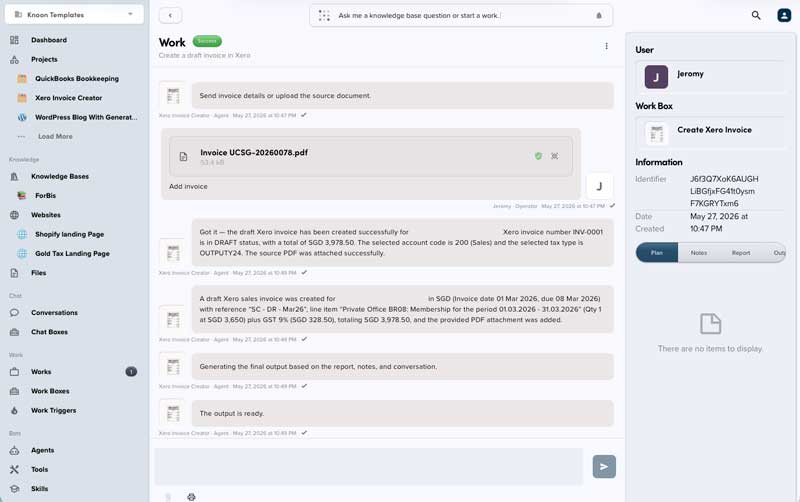
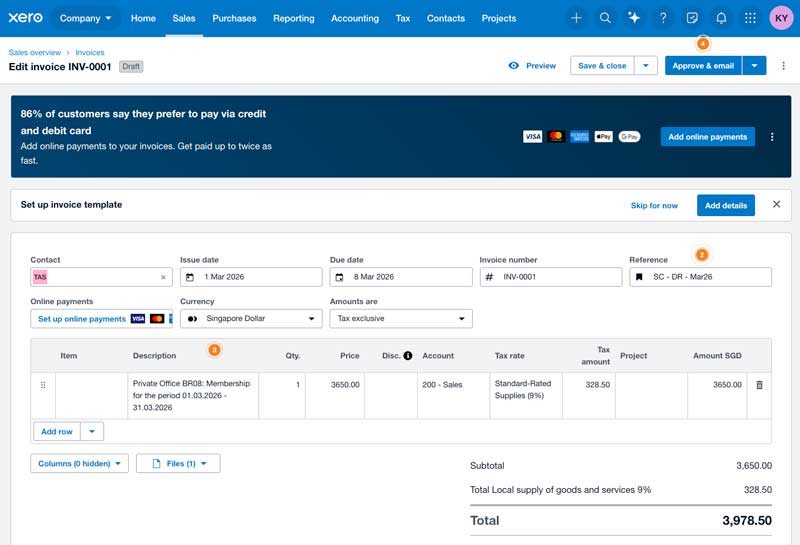
- Creates the invoice in Xero, using
DRAFTby default. - Uploads the source attachment to the created invoice when a file is provided.
Included Workflow
- Workbox:
Create Xero Invoice - Work agent:
Xero Invoice Creator - Extract agent:
Xero Invoice Intake
Expected Input
Provide as many invoice details as possible:
- Customer name and email
- Invoice date and due date
- Currency code, such as
SGDorUSD - Reference or purchase order number
- Line item descriptions
- Quantity and unit price
- GST or tax treatment
- Account code hints when known
- Optional source document to attach to the invoice
Review Points
Review the invoice before sending it to a customer, especially when:
- A new Xero contact was created.
- The account code was inferred from available Xero accounts.
- The tax type was inferred from available Xero tax rates.
- The source document did not clearly state GST or tax treatment.
- Extracted totals differ from the source document.
Output
The final response should include the Xero invoice ID or number, status, customer, total, selected account codes, selected tax types, warnings, and attachment result.
This template deploys automatically to the cloud. No coding, self-hosted n8n setup, or Make.com flows are required. The workflow runs deterministically, so it stays predictable compared with agent-driven tools like Manus, OpenAI, or Tasklet.