AI WordPress Blog With Generated Featured Image
WordPress Blog With Generated Featured Image
Create a WordPress-ready blog post from a short brief, generate a matching featured image, upload the image to WordPress, and create the post as a draft by default.
What This Template Does
This template builds a coordinated blog publishing workflow for WordPress. It turns a user's topic, notes, audience, tone, and publishing preference into:
- A polished WordPress blog title
- An SEO-friendly slug
- A short excerpt
- A complete HTML article body
- A generated featured-image prompt
- Featured-image alt text
- An uploaded WordPress media item
- A WordPress post created as a draft unless publication is explicitly requested
Included Workflow
Create WordPress Blog Draft
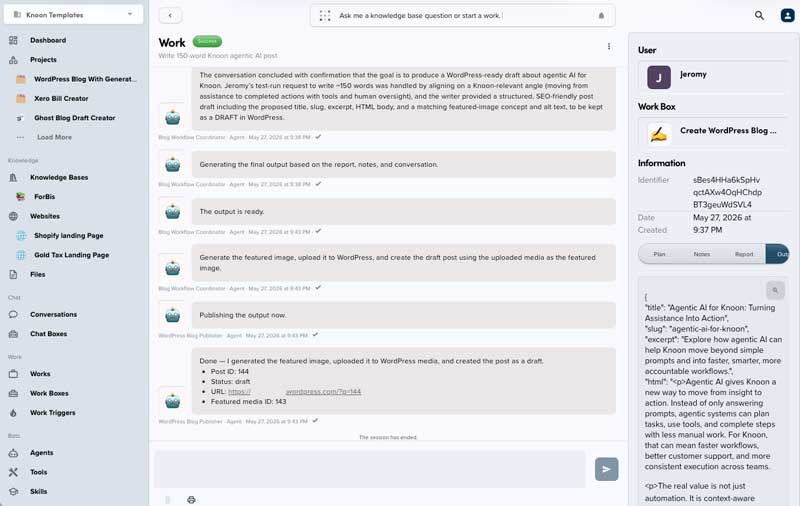
The main workbox coordinates the full process:
- Normalizes the user's blog brief.
- Routes the writing task to the blog writer.
- Routes image creation to the featured-image specialist.
- Uploads the generated image to WordPress media.
- Creates the WordPress post using the uploaded media item as the featured image.
The workflow returns structured JSON with the finalized article and WordPress post details.
Included Agents
- Blog Workflow Coordinator: Interprets the request and manages the workflow.
- WordPress Blog Writer: Writes the title, slug, excerpt, HTML body, and image direction.
- Featured Image Specialist: Generates a blog-ready featured image from the finalized prompt.
- WordPress Blog Publisher: Uploads the image and creates the WordPress post.
Included Tools
- Generate Featured Image: Generates the featured image from the approved image prompt.
- Upload Featured Image to WordPress: Uploads the generated image into the connected WordPress media library.
- Create WordPress Post: Creates the WordPress post using the final article content and featured media ID.
How To Use
Start the workbox and provide a brief with the details needed for the article.
Example:
Write a blog post about practical AI automation ideas for small ecommerce teams.
Audience: operations managers.
Tone: clear, helpful, non-technical.
Status: create a draft.
Useful inputs include:
- Topic or working title
- Target audience
- Tone and style
- Key points to include
- Keywords or SEO direction
- Desired article length
- Draft or publish preference
Publishing Behavior
The workflow is designed to create drafts by default. It should only publish immediately when the user explicitly asks for publication.
The generated featured image is uploaded to WordPress first. The returned WordPress media ID is then passed into the post creation step as the featured media ID.

This template deploys automatically to the cloud. No coding, self-hosted n8n setup, or Make.com flows are required. The workflow runs deterministically, so it stays predictable compared with agent-driven tools like Manus, OpenAI, or Tasklet.